Frappe Theme Studio — ERPNext Theme Engine
Frappe / ERPNext Customization
Frappe Theme Studio — ERPNext Theme Engine
No-Code Styling, Real-Time Desk Preview & Dynamic CSS Token Overrides
Key Metrics & Impact
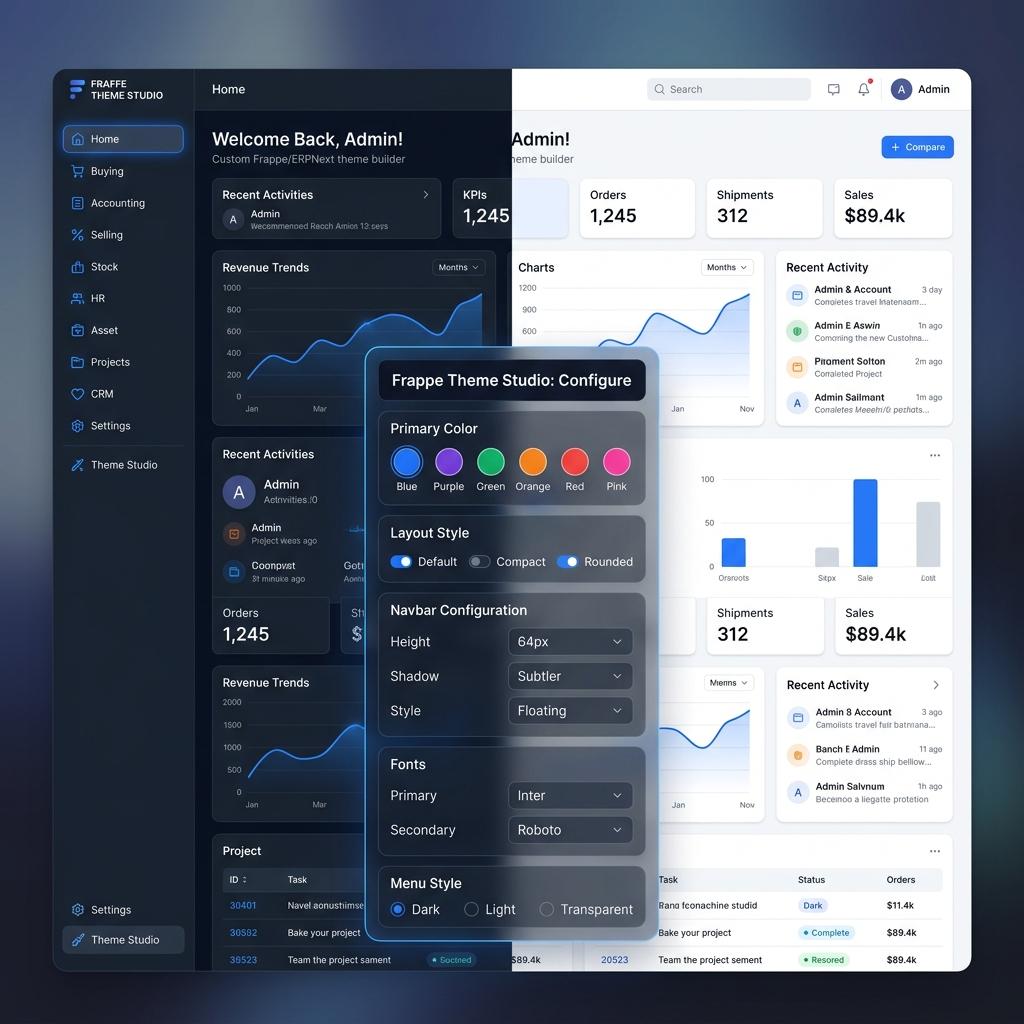
Switchable preset palettes (Blue, Purple, Green, Orange, Red, Pink) with full custom hex override support for brand alignment.
Fully independent dark and light mode stylesheets generated dynamically from a single configuration DocType.
Non-technical administrators personalize the entire ERPNext interface without touching a single line of CSS or JavaScript.
System Overview
Executive Summary
Out of the box, ERPNext ships with a functional but visually dated and brand-neutral interface. For organizations embedding ERPNext as a client-facing SaaS product, a white-label portal, or an internal branded tool, this presents a significant problem: every deployment looks identical. Frappe Theme Studio is a purpose-built Frappe custom app that transforms the ERPNext desk into a fully personalized, branded workspace. Administrators configure their theme through an intuitive settings interface — choosing color palettes, toggling between dark and light modes, adjusting layout styles, configuring the navbar, selecting fonts, and injecting custom CSS — all with a live preview engine that reflects changes instantly without a page reload.
The Project Challenge
Businesses deploying ERPNext for client-facing portals, reseller white-label solutions, or internal enterprise tools consistently require a branded visual identity that extends into their ERP workspace. Standard ERPNext offers only minimal theming via basic accent colors, leaving organizations without meaningful control over sidebar styles, typography, dark mode aesthetics, navbar behavior, or layout density. Without custom theming, enterprises risk a disjointed brand experience — employees and clients interacting with an interface that feels disconnected from the company's design language. Frappe Theme Studio was built to close this gap entirely, delivering a no-code, administrator-friendly theming layer on top of any Frappe or ERPNext instance.
Main Objectives
- Build a native Frappe custom app that intercepts and overrides ERPNext's default CSS variable layer
- Engineer a real-time live preview system where theme changes reflect instantly without full page reloads
- Implement a color palette engine supporting 6+ preset palettes (Blue, Purple, Green, Orange, Red, Pink) with custom hex override
- Deliver fully independent dark mode and light mode stylesheet generation from a single configuration source
- Build a Layout Style Switcher supporting Default, Compact, and Rounded density modes
- Create a Navbar Configurator with control over height, shadow depth, style (Floating, Sticky, Transparent)
- Implement a Font Manager supporting Google Fonts integration for primary and secondary typeface selection
- Provide a raw Custom CSS injection box for advanced power users requiring component-level overrides
System Architecture
Role-Based Controls & Security
Theme configuration access is strictly controlled through Frappe's Role Permissions Manager. System Managers and designated Theme Administrators can modify global theme settings that apply organization-wide. Regular desk users (Accountants, HR Officers, Sales Reps, etc.) interact only with the resulting themed interface — they have no visibility into or access to the theme configuration DocType. This ensures brand consistency is maintained centrally without risk of individual users overriding the corporate visual identity.
Automated Workflows
The theme engine is fully automated from configuration to deployment: saving the Theme Configuration DocType triggers a server-side hook that compiles and writes the CSS variable block to Frappe's site_config override path. The next desk load picks up the changes automatically. For dark/light toggling, a lightweight JavaScript module persists the user's mode preference in localStorage and re-applies it on every page load before the first paint — eliminating flash-of-wrong-theme (FOWT). Scheduled cache-busting logic ensures compiled theme assets are refreshed with each configuration change.
UX Redesign & Styling System
Frappe Theme Studio itself ships with a clean, minimal settings interface designed to feel native to ERPNext. The configuration sidebar uses icon-based section navigation (Layout, Navbar, Menu, Fonts), color swatches render as vibrant interactive tiles with active-state checkmarks, and layout previews are displayed as miniaturized dashboard wireframes. The resulting themes can span from deep corporate navy dark modes to clean white-space light interfaces — the full design surface of ERPNext adapts to the client's brand.
Business Impact & Outcomes
- •Enabled businesses to ship fully white-labeled ERPNext portals with zero custom CSS skills required from administrators
- •Dark and light mode support expanded ERPNext accessibility and usability across diverse workspace environments
- •Reduced per-client branding customization effort from days of bespoke CSS work to under 10 minutes of no-code configuration
- •Theme Studio's CSS variable architecture ensured forward compatibility — ERPNext upgrades do not break applied themes
- •Delivered a live preview engine that eliminated the traditional save-reload-inspect iteration loop during theme configuration
- •Adopted by multiple client deployments requiring branded ERP portals, demonstrating immediate ROI over manual per-instance CSS overrides