Garage Pro — Auto Repair Workshop ERP
Automotive / Auto Repair ERP
Garage Pro — Auto Repair Workshop ERP
Vehicle Intake Diagnosis, Bay Assignment & 1-Click Invoice Generation
Key Metrics & Impact
Purpose-built Frappe DocTypes covering the full auto repair lifecycle — from vehicle intake to invoicing — native to ERPNext v15.
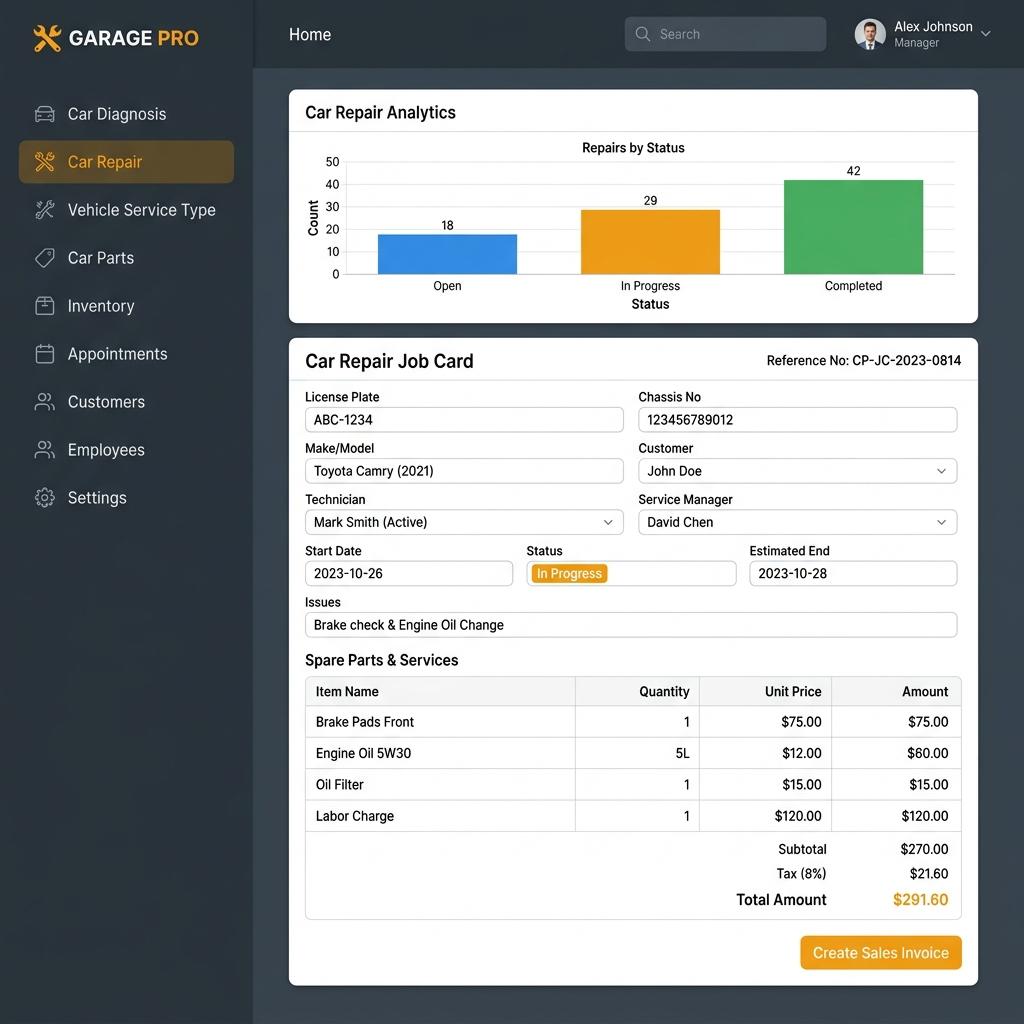
Car Repair job cards generate ERPNext Sales Invoices in a single click, with service costs and spare parts totals pre-populated automatically.
Duplicate service prevention logic in the Car Diagnosis form filters already-selected services out of the child table lookup in real time.
System Overview
Executive Summary
Auto repair workshops running ERPNext out of the box face an immediate gap: ERPNext is built for manufacturing and distribution, not for vehicle-centric repair operations. Garage Pro is a native Frappe v15 custom app that installs on top of ERPNext and fills this gap entirely. It introduces a domain-specific DocType architecture — Car Diagnosis, Car Repair, Vehicle Service Type, Car Info, Car Photo, and related child tables — that maps directly to how a real garage operates: a customer brings in a vehicle, a technician diagnoses it, a job card is opened with services and spare parts, and a Sales Invoice is generated upon completion. Built solo in May 2025 in 2–3 weeks, the app integrates natively with ERPNext's Customer, Vehicle, Item (spare parts), Sales Quotation, and Sales Invoice modules, creating a seamless end-to-end operational system.
The Project Challenge
Auto repair shops and service centers operating on ERPNext have no native way to manage vehicle-specific workflows: there is no concept of a diagnosis session, a repair job card linked to a license plate, or technician workstation allocation. Service managers were forced to repurpose generic Manufacturing Work Orders or Maintenance modules — creating mismatched data models, manual workarounds, and reporting blind spots. Garage Pro was built to solve this precisely: a lightweight, installable module that speaks the language of automotive repair — car, chassis number, diagnosis priority, technician, workspace bay, service checklist, spare parts consumption — all natively within the familiar Frappe desk environment.
Main Objectives
- Design a Car Diagnosis DocType (auto-numbered D-####) for vehicle intake: customer lookup by mobile, priority triage (Low/Normal/High/Urgent), receipt date, linked car details, and a services child table with duplicate-prevention filtering
- Build a Car Repair DocType (auto-numbered CR-#####) as the central job card: linked to Car Diagnosis, License Plate (Vehicle), Chassis No, Fuel Type, Technician and Service Manager allocation, workstation/bay assignment, spare parts items table, service cost and total cost calculation
- Implement a Vehicle Service Type master catalog with service name, estimated cost, estimated time, service fee, parts cost, linked spare parts, and remarks for pre-configured service packages
- Create Car Info and Car Info Multi child DocTypes for attaching structured vehicle details (multi-vehicle support) to diagnosis records
- Build a Car Photo child DocType for attaching pre-repair and post-repair vehicle condition photo documentation
- Develop a Service Item Checklist child DocType for structured pre-service inspection checklists on repair records
- Implement a public-facing Frappe Web Form (route: /request) allowing customers to submit Car Diagnosis Requests anonymously without requiring a login
- Configure a Frappe Workspace dashboard with a Car Repair Bar Chart (repairs by status) and quick-access shortcuts to all key DocTypes
System Architecture
Role-Based Controls & Security
The install.py setup hook programmatically configures Frappe Role Permissions at install time for two custom roles: Service Manager (can create and read Car Diagnosis, Car Repair, Vehicle, and Customer records) and Technician (read-only access to assigned Car Repair job cards and Vehicle records). This separation ensures technicians see only their work queue without access to financial data or customer management, while service managers have full operational control. ERPNext's System Manager role retains unrestricted access to all DocTypes including Sales Invoices, Items, and financial reports.
Automated Workflows
Garage Pro implements several key automation patterns using Frappe's client-side JavaScript controller system:\n\n• Mobile-based Customer Lookup: Typing a mobile number in Car Diagnosis triggers a frappe.client.get_list call to auto-match and populate the Customer, customer_name, and email fields — eliminating manual customer search for returning vehicle owners.\n• Duplicate Service Guard: The services child table's get_query dynamically filters out already-selected Vehicle Service Types, preventing the same service from being added twice to a diagnosis.\n• Real-Time Cost Calculation: Car Repair's JavaScript recalculates item_cost (sum of spare parts × quantity) and total_cost (item_cost + service_cost) on every field change, keeping the financial summary always accurate without requiring a save.\n• Attachment Preview: Uploading a photo attachment to Car Repair immediately renders it in an inline image_preview field, giving service managers instant visual confirmation of vehicle condition documentation.\n• Designation-Filtered Staff Lookup: Technician and Service Manager link fields use set_query with designation filters, so the dropdown only ever shows ERPNext Employees with the correct job title — no incorrect staff assignments possible.
UX Redesign & Styling System
Garage Pro inherits the ERPNext v15 desk aesthetic and extends it with automotive-domain language and workflow patterns. The dedicated Garage Pro Workspace presents a clean operational hub with a live bar chart of repair volumes by status (Open / In Progress / Completed) and icon shortcut tiles to all primary DocTypes. Form layouts use Frappe's Tab Break and Section Break fields to logically group: Customer Details, Car Details, Allotment (Technician/Manager/Workspace), Services & Spare Parts, Pricing, and Damage/Repair notes — keeping the dense data of a repair job card navigable and scannable for workshop staff.
Business Impact & Outcomes
- •Delivered a complete, installable auto repair ERP module for Frappe v15 as a solo engineer in 2–3 weeks (May 2025)
- •Eliminated the need for manual ERPNext workarounds by introducing vehicle-centric DocTypes (Car Diagnosis, Car Repair) native to the Frappe framework
- •One-click Sales Invoice generation from Car Repair job cards reduced post-repair billing time to under 60 seconds
- •Mobile-based customer auto-lookup removed repetitive data re-entry for returning vehicle owners, directly within the intake form
- •Duplicate service prevention logic enforced data integrity in diagnosis records without any server-side validation overhead
- •Public web form (/request) enabled customers to submit repair appointment requests 24/7 without garage staff involvement, feeding directly into the internal diagnosis queue